How to reduce the size of Docker Images
How to reduce the size of Docker Images
From Raghav Dua.
If you’re reading this, chances are you’re running very large Docker containers in production. A Container that’s several gigabytes in size slows deployments, increases bandwidth & storage costs and consumes valuable time of developers.
So here’s how you make Docker Images slimmer:
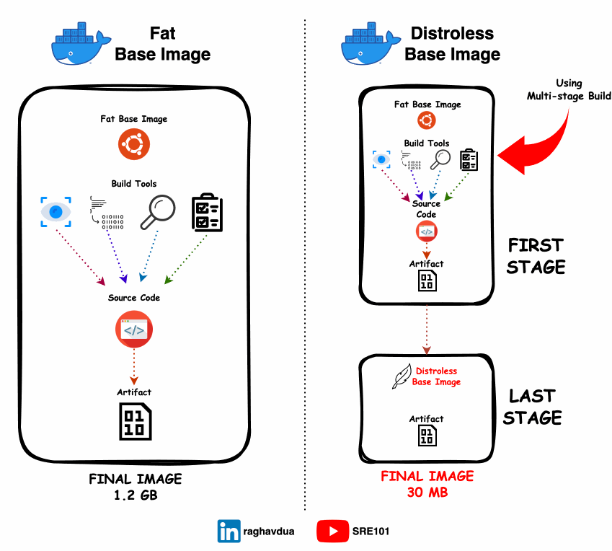
👉 Leverage Multi-stage builds Multi-stage builds separate the build environment from the final runtime environment. They allow you to compile & package your application in one stage and then copy only the necessary artifacts to the final image, reducing its size significantly. 🔗 doc - https://lnkd.in/eNR28x6h
👉 Build Images from Scratch If you only need to run a statically-compiled, standalone executable (like a C++ or Go application), pack it inside an empty Image by using “scratch” as the base image. 🔗 I made a small video on how to do this - youtu.be/XSqteQFaHBA
👉 Use fewer Layers Each instruction like RUN or COPY adds another layer to your image, thus increasing its size. Each layer comes with its own metadata & file system structures. The fewer layers you use, the lesser data overhead your image has. 🔗 https://lnkd.in/eNkvGHAa
👉 Use Distroless Images These are base images that contain only your application and its runtime dependencies. There are no package managers, shell programs or anything that you normally find in a Linux distribution.
The smallest Distroless Image is just 2MB 🤯
You use Docker’s Multi-stage build and in its last stage, use Distroless as your base image and cherry-pick only the files that are needed to run the container. This would normally include your compiled binary.
This is the most powerful way to end up with a super light image that is easy to run and maintain in production 🚀
Bonus
My thoughts around it other than the points mentioned
- We may not always be required to build a scratch image, so in that case we should pick up an alpine distribution that ensures we have minimum kernel utilities that helps to run the application as well the size is comparatively small
- Leveraging image compression tools to minimize the image size Dive (https://github.com/wagoodman/dive) Docker Slim (https://github.com/slimtoolkit/slim) DockerSquash (https://github.com/goldmann/docker-squash)
- .dockerignore file can help us to avoid copy unnecessary files and reduce the image size too.
- https://dev.to/kitarp29/reducing-docker-image-size-a67
