Language Compiler Guide
development Self Compiling Languages
C
| Arjun4522 | Exploring the Power of Self-Compiling C Compilers |
In the programming language world, C remains a popular choice for developers because of its low-level implementation, fundamentality, flexibility, and widespread usability. It is the primary tool for developing software programs, operating systems, and embedded applications. Over time, developers have pushed the boundaries of what is possible with C, resulting in new developments frequently. In this blog, we will delve into the concept of self-hosting C compilers, their usefulness, their disadvantages, and their impact on the world of programming.
Understanding Self-Compiling C Compilers
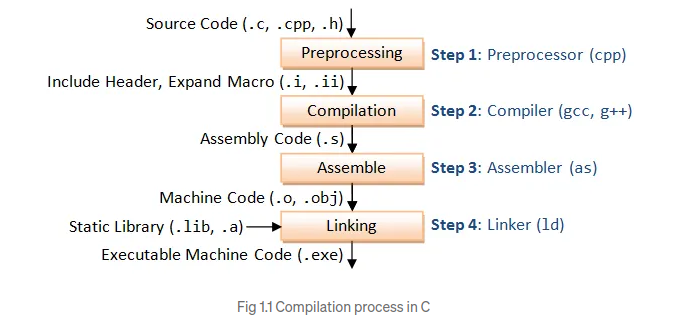
The C compiler is a software tool that translates human-readable C programming code into machine-readable instructions that can be executed by a computer. The primary function of the C compiler is to perform a series of tasks, including lexical analysis, parsing, semantic analysis, optimization, and code generation. The above figure 1.1 shows the compilation process in C.
A self-compiling compiler, also known as a “self-hosting compiler”, is a compiler that is capable of compiling its own source code. It is an interesting concept that involves building a compiler in the same language it is designed to compile. Essentially, a self-compiling C compiler takes a set of C source files as input and generates a binary executable that is capable of compiling other C programs. The development of such compilers uses the process of “bootstrapping”, where, a compiler written in a particular programming language is used to compile a new version of the compiler written in the same language.
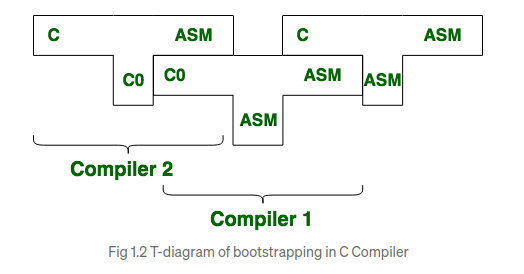
The self-compiling process involves several stages. As shown in above figure 1.2, initially, an initial version of the C compiler is written in another programming language, such as assembly(assembly language is often chosen for writing compilers due to its low-level control, and access to low-level features and hardware). This initial version of the compiler, often referred to as the “bootstrap compiler,” is responsible for compiling the source code of the C compiler itself. Once the bootstrap compiler is created, it is used to compile a more sophisticated version of the C compiler, which is then capable of compiling more complex C programs. This process can be repeated iteratively to refine and enhance the capabilities of the C compiler.
This technique of compiler design is alternative to the process of “Cross Compilation”, where a compiler executes on one computer architecture and generates target programs to be executed on another computer architecture. It involves using a compiler that is specifically designed to generate machine code for the target platform, which may have a different hardware architecture or operating system than the host machine.
The concept of a bootstrap compiler is not only limited to C compilers; it can be applied to compilers for other programming languages as well. It exemplifies the power of self-compilation and demonstrates the ability to create a self-sustaining ecosystem where a compiler can continuously improve itself, leading to more robust and efficient software development tools.
Benefits and Advantages
- Portability: One of the significant advantages of self-compiling C compilers is their portability across different platforms. Since the compiler is written in C, it can be easily adapted to various architectures and operating systems. This portability allows developers to use the self-compiling C compiler on different machines without major modifications.
- Efficiency: Self-compiling C compilers tend to be highly optimized for generating efficient machine code. As the compiler evolves and iteratively compiles itself, it can incorporate performance optimizations specific to the target architecture. This results in generated code that is tailored for the specific hardware, enhancing the overall execution speed of the compiled programs.
- Continuous Improvement: Self-compiling C compilers facilitate a continuous improvement process. As developers enhance the compiler’s functionality, they can directly compile the compiler’s source code to test and validate their modifications. This iterative process allows for rapid prototyping, bug fixing, and feature enhancements, contributing to a more robust and reliable compiler.
- Independence: Self-compiling C compilers provide developers with a high degree of independence. They allow developers to bootstrap their development environment, reducing reliance on external tools or third-party compilers. Once a self-hosting compiler is available, it can be used to compile subsequent versions of itself, creating a self-sufficient ecosystem. Disadvantages:
Disadvantages
- Complexity: Self-compiling compilers are typically more complex than simple compilers or interpreters. They require a significant amount of development effort and expertise to design and implement. The process of bootstrapping and maintaining a self-hosting compiler can be challenging, requiring deep knowledge of the language and compiler internals.
- Debugging: When a self-compiling compiler encounters a bug or error, debugging can be more complicated. Since the compiler itself is responsible for generating the executable code, debugging issues within the compiler can be intricate and time-consuming. Debugging tools and techniques specific to self-hosting compilers may be required. Impact on Programming:
Self-compiling C compilers have had a significant impact on the programming community. They have contributed to the development and refinement of C compilers, leading to increased performance, improved language features, and enhanced support for different platforms. The evolution of self-compiling C compilers has played a vital role in shaping the programming landscape, enabling the creation of powerful software systems that have transformed various industries.
Conclusion
Self-compiling C compilers exemplify the ingenuity and dedication of the programming community. They showcase the ability to create a compiler capable of compiling its own source code, resulting in portable, efficient, and continuously improving tools. As developers continue to push the boundaries of what is possible, self-compiling C compilers will likely remain an essential tool in the programmer’s arsenal, facilitating the creation of cutting-edge software solutions.
Compiled & Interpreted Languages
Java
| Alex Klimenko | How Compilation Works in Java |
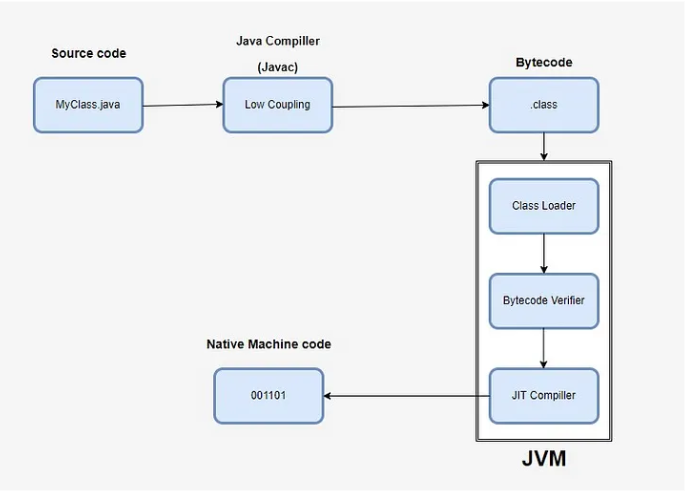 Compilation in Java is a multi-step process that converts human-readable Java source code into machine-readable bytecode that can be executed by the Java Virtual Machine (JVM). This process involves several stages: writing the code, invoking the compiler, generating bytecode, and verifying the bytecode.
The compilation process in Java ensures that source code is transformed into an optimized, secure, and platform-independent format (bytecode), ready to be executed by the JVM. This multi-step process includes writing the source code, invoking the compiler, generating bytecode, and verifying the bytecode, culminating in execution on the JVM.
Java compilation supports: Portability: Java’s bytecode allows the compiled code to run on any platform with a compatible JVM, adhering to the “write once, run anywhere” philosophy. Security: Bytecode verification helps prevent malicious code from compromising the system. Efficiency: The use of bytecode and the JVM enables efficient execution through interpretation and JIT compilation. The compilation process in Java involves multiple stages, primarily focusing on translating Java source code into bytecode, which can then be executed by the Java Virtual Machine (JVM). Here’s a detailed look at the different compilation flows and whether the compilation is done synchronously or asynchronously.
Compilation types Ahead-of-Time (AOT) Compilation AOT compilation translates Java source code directly into native machine code before execution. This is less common in typical Java environments but can be used to optimize startup times and performance for specific applications. The GraalVM and the jaotc tool (part of the JDK) can perform AOT compilation.
Just-In-Time (JIT) Compilation JIT compilation occurs at runtime, where the JVM compiles bytecode into native machine code as the application runs. This approach balances between startup time and execution performance. The HotSpot JVM includes a JIT compiler.
Asynchronous vs. Synchronous Compilation Java’s compilation process can occur in different flows, primarily AOT and JIT, with the latter being more common. JIT compilation can be performed either synchronously, with potential pauses during execution, or asynchronously, which allows for continuous execution while compiling in the background. The HotSpot JVM supports both synchronous and asynchronous compilation, optimizing for both performance and responsiveness.
Synchronous Compilation Synchronous compilation occurs in real-time as the JVM executes the code. It typically involves an initial phase where the bytecode is interpreted until the JIT compiler kicks in for hot methods.
Pros: Simplifies the flow, as compilation and execution are tightly integrated. Cons: May introduce pauses or latency during the initial phase of execution due to the JIT compilation overhead. Asynchronous Compilation Asynchronous compilation, or background compilation, allows the JVM to continue executing code while the JIT compiler works on compiling hot methods in the background. This approach minimizes the impact of compilation on application performance.
HotSpot JVM Implementation: The HotSpot JVM supports asynchronous compilation with the -XX:+BackgroundCompilation flag enabled by default. Point good to know to interview Ahead-of-Time (AOT) Compilation: Less common, pre-compiles code into native machine code for optimized startup and performance. Just-In-Time (JIT) Compilation: Standard approach in Java, compiles bytecode into native code at runtime for improved performance. Synchronous Compilation: Simplifies flow but may introduce execution latency due to real-time compilation. Asynchronous Compilation: Enhances performance by compiling in the background, reducing impact on execution. Java compilation process After you have you .class files, Java Compiler (javac) generates Bytecode.
- Generating Bytecode Compilation Process: The javac compiler translates the Java source code into bytecode. This intermediate representation is platform-independent and stored in .class files.
Parsing: The compiler reads the source code and parses it into an Abstract Syntax Tree (AST), representing the hierarchical structure of the code. Semantic Analysis: The compiler checks for semantic errors, such as type mismatches, undefined variables, and other logical errors. Optimization: Some compilers perform optimization to improve the efficiency of the bytecode, though Java’s focus is on maintaining readability and portability of the bytecode. Bytecode Generation: The AST is then translated into bytecode, which is a low-level, platform-independent set of instructions for the JVM.
- Verifying the Bytecode Bytecode Verifier: Before execution, the JVM performs bytecode verification to ensure the code adheres to Java’s security and integrity constraints.
Verification Steps: The verifier checks for illegal code that could violate access rights or produce runtime errors. This step includes checks for type safety, stack overflow, and proper use of objects and arrays.
- Execution Java Virtual Machine (JVM): The JVM interprets or just-in-time (JIT) compiles the bytecode into native machine code specific to the underlying hardware platform.
Class Loader: The JVM uses the class loader to load classes as needed. This dynamic loading ensures that only the necessary classes are loaded, reducing memory usage. Execution Engine: The execution engine of the JVM interprets the bytecode or uses JIT compilation to convert bytecode into native instructions for better performance. Compilation Flags in HotSpot JVM The HotSpot JVM, part of the OpenJDK and Oracle’s JDK, offers a range of compilation flags that control various aspects of the Just-In-Time (JIT) compilation process and the behavior of the JVM. These flags can be used to optimize performance, debug issues, and configure JVM settings for specific use cases.
Here are some commonly used HotSpot JVM compilation flags:
Optimization Flags: -server: Runs the JVM in server mode, which optimizes performance for long-running applications by enabling more aggressive optimizations and a different garbage collection strategy. -client: Runs the JVM in client mode, which is optimized for quick startup and smaller memory footprint, suitable for short-lived applications. -XX:+AggressiveOpts: Enables experimental performance optimizations that may improve performance. This flag activates optimizations that are not yet enabled by default. -XX:+OptimizeStringConcat: Optimizes the performance of string concatenation by converting it to a more efficient sequence of operations. -XX:+UseSuperWord: Enables the use of SIMD (Single Instruction, Multiple Data) instructions to optimize operations on arrays of primitive types.
- Debugging and Logging Flags -XX:+PrintCompilation: Prints information about methods as they are compiled by the JIT compiler. Useful for understanding which methods are being compiled and when. -XX:+PrintInlining: Prints detailed information about method inlining decisions made by the JIT compiler. This helps in understanding the inlining process and optimizing method call performance. -XX:+UnlockDiagnosticVMOptions: Unlocks additional diagnostic JVM options that are not available by default. This is often used in combination with other flags for advanced debugging and performance tuning. -XX:+LogCompilation: Logs compilation activities to a file. This is useful for post-mortem analysis of JIT compilation behavior.
- Garbage Collection Flags -XX:+UseG1GC: Enables the Garbage-First (G1) Garbage Collector, which is designed for low-latency and high-throughput applications. This collector aims to meet specified pause-time goals with high probability. -XX:+UseParallelGC: Enables the parallel garbage collector, which uses multiple threads for garbage collection tasks, improving performance on multi-core systems. -XX:+UseConcMarkSweepGC: Enables the Concurrent Mark-Sweep (CMS) garbage collector, which aims to minimize pause times by performing most of the garbage collection work concurrently with the application.
- Memory Management Flags
-Xms
: Sets the initial heap size for the JVM. For example, -Xms512m sets the initial heap size to 512 MB. -Xmx : Sets the maximum heap size for the JVM. For example, -Xmx1024m sets the maximum heap size to 1024 MB. -XX:NewSize= : Sets the initial size of the young generation heap. -XX:MaxNewSize= : Sets the maximum size of the young generation heap. -XX:MetaspaceSize= : Sets the initial size of the metaspace, where class metadata is stored. -XX:MaxMetaspaceSize= : Sets the maximum size of the metaspace. - Compilation Control Flags
-XX:CompileThreshold=
: Sets the number of method invocations/loops before the JIT compiler compiles the method. A lower value causes more frequent compilations. -XX:+TieredCompilation: Enables tiered compilation, where the JVM uses both the client and server JIT compilers. The client compiler performs fast, initial compilations, while the server compiler performs more aggressive optimizations for frequently used methods. -XX:+BackgroundCompilation: Enables background compilation, allowing the JVM to compile methods in the background while the application continues to run. This reduces pause times due to compilation. - Miscellaneous Flags -XX:+UseCompressedOops: Enables the use of compressed ordinary object pointers, reducing memory consumption and improving performance on 64-bit JVMs. -XX:+UseStringDeduplication: Enables string deduplication, which helps reduce memory usage by identifying and merging duplicate string objects in the heap. The HotSpot JVM offers a wide range of compilation flags that can be tailored to optimize performance, debug issues, and configure the JVM for specific requirements. By understanding and utilizing these flags, developers can significantly enhance the performance and behavior of their Java applications.
Flags which is good to know for interview: Performance Optimization: Use flags like -server, -XX:+AggressiveOpts, and -XX:+OptimizeStringConcat to enhance application performance. Debugging and Monitoring: Utilize flags such as -XX:+PrintCompilation, -XX:+PrintInlining, and -XX:+LogCompilation for detailed insights into the JIT compilation process. Memory and Garbage Collection: Configure memory settings and choose appropriate garbage collectors using flags like -Xms, -Xmx, -XX:+UseG1GC, and -XX:+UseParallelGC. Compilation Control: Control the JIT compilation process with flags such as -XX:CompileThreshold, -XX:+TieredCompilation, and -XX:+BackgroundCompilation. These flags provide powerful tools for tuning and optimizing Java applications running on the HotSpot JVM.
GraalVM Modern Java applications very widelly use GraalVM. And we need to mention this. GraalVM is a versatile virtual machine and runtime environment that supports multiple programming languages. It’s designed to offer high performance, compatibility, and interoperability across different language ecosystems. One of its key features is polyglot execution, meaning it can run applications written in languages like Java, JavaScript, Python, Ruby, R, and more on the same platform.
GraalVM incorporates a just-in-time (JIT) compiler to optimize the performance of applications, aiming for better throughput and lower latency compared to traditional JVMs (Java Virtual Machines). Additionally, it provides a native image builder, enabling the compilation of JVM-based applications into native executables ahead-of-time. This feature can result in faster startup times and reduced memory overhead.
The platform promotes interoperability between languages, allowing developers to seamlessly call functions written in one language from another. It includes the Truffle framework, which simplifies the implementation of programming languages and provides tools for building high-performance language runtimes.
GraalVM can be embedded in various environments, such as databases, applications, and microservices, making it suitable for a wide range of use cases including cloud computing, microservices architecture, data processing, and high-performance computing.
Overall, GraalVM is an open-source project with support for multiple platforms, offering developers a powerful and flexible runtime environment for executing applications written in different languages efficiently.
Summary Java compilation involves converting source code into a form that can be executed by the Java Virtual Machine (JVM). This can be done ahead-of-time (AOT) or just-in-time (JIT). AOT compilation translates Java code directly into native machine code before execution, optimizing for startup times and performance using tools like GraalVM and jaotc. JIT compilation, on the other hand, occurs at runtime and involves interpreting bytecode initially, profiling frequently executed (hot) methods, and compiling them into native code. The HotSpot JVM supports both synchronous JIT compilation, which happens in real-time, and asynchronous (background) JIT compilation, which reduces performance impact by compiling methods while the application runs.
Inlining is a crucial optimization technique where method calls are replaced with the actual method code. This reduces the overhead associated with method calls, enables further optimizations, and improves cache performance. While inlining can increase code size and make debugging more complex, it is widely used in the HotSpot JVM to enhance the performance of Java applications by minimizing the overhead of method calls and exposing more opportunities for optimization.
Interpreted Languages
Python
| Brij kishore Pandey | Brij kishore Pandey |
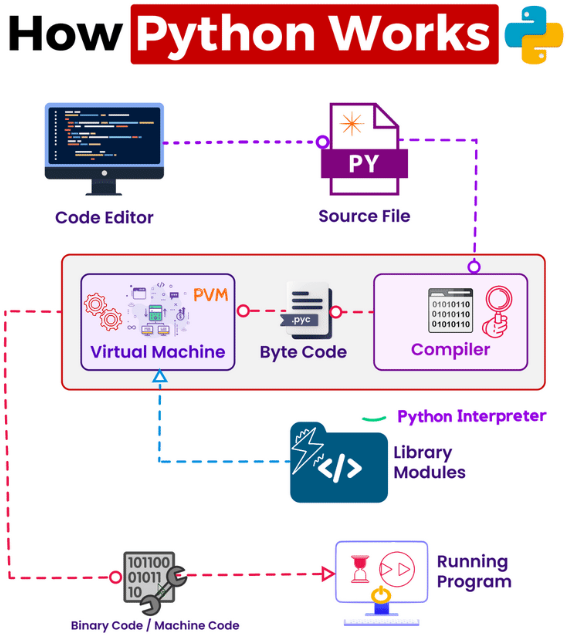
Let’s walk through a simplified guide to understanding how your Python code becomes a functioning program:
-
𝗪𝗿𝗶𝘁𝗶𝗻𝗴 𝘁𝗵𝗲 𝗖𝗼𝗱𝗲: We start with typing out our Python program in a text editor, saving it as a ‘.py’ file.
-
𝗣𝘆𝘁𝗵𝗼𝗻 𝗜𝗻𝘁𝗲𝗿𝗽𝗿𝗲𝘁𝗲𝗿: When we run the program, it’s sent into the Python Interpreter, which is made up of two parts:
-
𝗖𝗼𝗺𝗽𝗶𝗹𝗲𝗿: This part changes our Python code into something called byte code. This byte code is saved in a ‘.pyc’ file, helping our program run faster the next time.
-
𝗣𝘆𝘁𝗵𝗼𝗻 𝗩𝗶𝗿𝘁𝘂𝗮𝗹 𝗠𝗮𝗰𝗵𝗶𝗻𝗲 (𝗣𝗩𝗠): The PVM uses the byte code and follows the instructions one by one until the program is finished or runs into an error.
-
𝗟𝗶𝗯𝗿𝗮𝗿𝘆 𝗠𝗼𝗱𝘂𝗹𝗲𝘀: If our program uses library modules from Python’s standard library or elsewhere, these are also changed into byte code. The PVM then uses this byte code, allowing our program to use the features of these modules.
-
F𝗿𝗼𝗺 𝗕𝘆𝘁𝗲 𝗖𝗼𝗱𝗲 𝘁𝗼 𝗠𝗮𝗰𝗵𝗶𝗻𝗲 𝗖𝗼𝗱𝗲: The PVM further converts the byte code into machine code, which is a series of 1s and 0s. This machine code is what your computer’s brain, the CPU, can directly understand.
-
𝗥𝘂𝗻𝗻𝗶𝗻𝗴 𝘁𝗵𝗲 𝗣𝗿𝗼𝗴𝗿𝗮𝗺: After the machine code is ready, your computer uses it to run your program. And there you have it! Your Python program is up and running.
Understanding the transition from Python code to a running program provides insight into how Python, as an interpreted language, bridges the gap between the high-level code we write and the low-level operations performed by a computer.