System Design Guide
system-design CAP Theorem
| Alex Xu ByteByteGo | “CAP theorem: one of the most misunderstood terms” |
Let’s take a look.
CAP theorem: one of the most misunderstood terms
The CAP theorem is one of the most famous terms in computer science, but I bet different developers have different understandings. Let’s examine what it is and why it can be confusing.
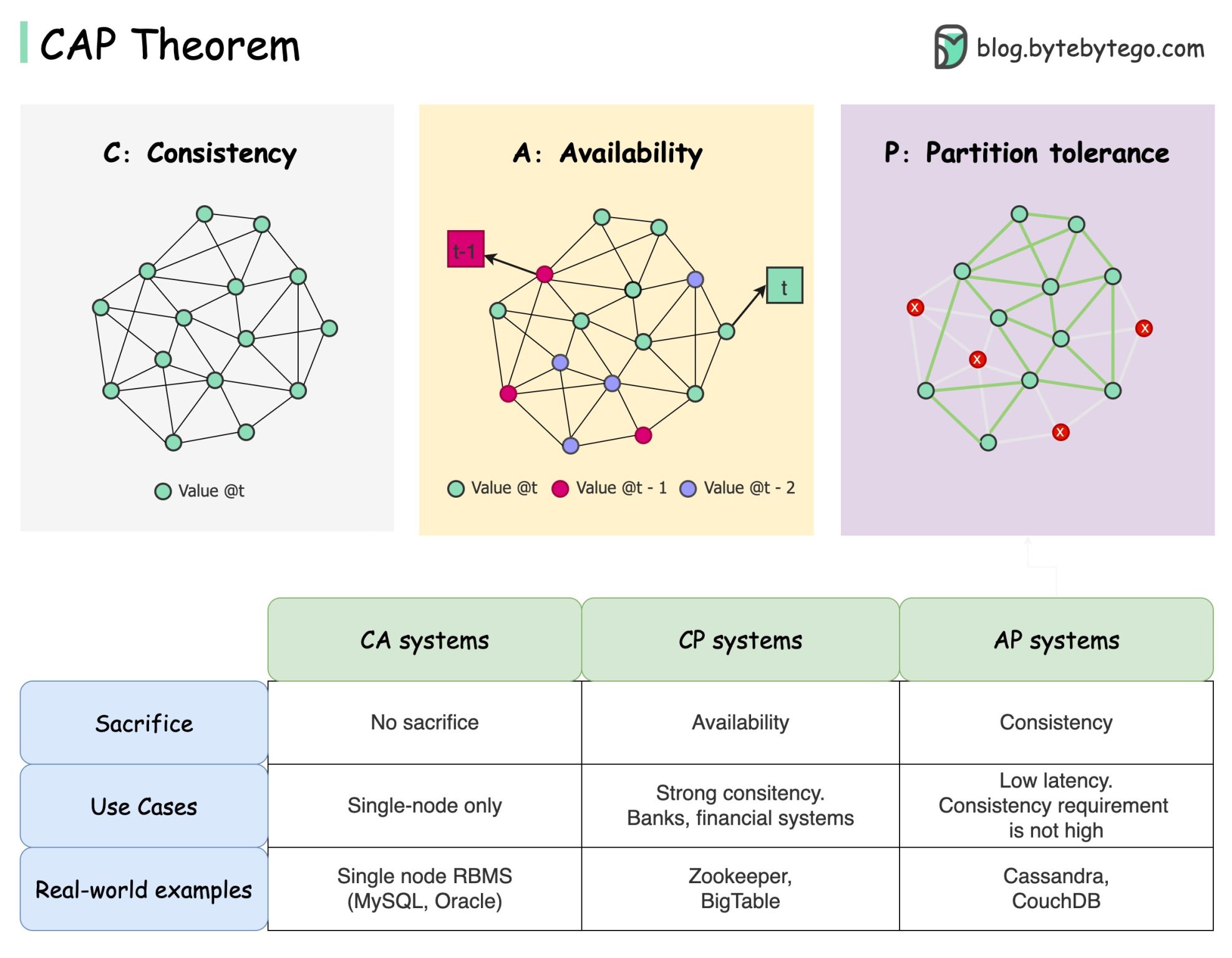
CAP theorem states that a distributed system can’t provide more than two of these three guarantees simultaneously.
𝐂𝐨𝐧𝐬𝐢𝐬𝐭𝐞𝐧𝐜𝐲: consistency means all clients see the same data at the same time no matter which node they connect to.
𝐀𝐯𝐚𝐢𝐥𝐚𝐛𝐢𝐥𝐢𝐭𝐲: availability means any client which requests data gets a response even if some of the nodes are down.
𝐏𝐚𝐫𝐭𝐢𝐭𝐢𝐨𝐧 𝐓𝐨𝐥𝐞𝐫𝐚𝐧𝐜𝐞: a partition indicates a communication break between two nodes. Partition tolerance means the system continues to operate despite network partitions.
The “2 of 3” formulation can be useful, 𝐛𝐮𝐭 𝐭𝐡𝐢𝐬 𝐬𝐢𝐦𝐩𝐥𝐢𝐟𝐢𝐜𝐚𝐭𝐢𝐨𝐧 𝐜𝐨𝐮𝐥𝐝 𝐛𝐞 𝐦𝐢𝐬𝐥𝐞𝐚𝐝𝐢𝐧𝐠.
-
Picking a database is not easy. Justifying our choice purely based on the CAP theorem is not enough. For example, companies don’t choose Cassandra for chat applications simply because it is an AP system. There is a list of good characteristics that make Cassandra a desirable option for storing chat messages. We need to dig deeper.
-
“CAP prohibits only a tiny part of the design space: perfect availability and consistency in the presence of partitions, which are rare”. Quoted from the paper: CAP Twelve Years Later: How the “Rules” Have Changed.
-
The theorem is about 100% availability and consistency. A more realistic discussion would be the trade-offs between latency and consistency when there is no network partition. See PACELC theorem for more details.
𝐈𝐬 𝐭𝐡𝐞 𝐂𝐀𝐏 𝐭𝐡𝐞𝐨𝐫𝐞𝐦 𝐚𝐜𝐭𝐮𝐚𝐥𝐥𝐲 𝐮𝐬𝐞𝐟𝐮𝐥? I think it is still useful as it opens our minds to a set of tradeoff discussions, but it is only part of the story. We need to dig deeper when picking the right database.
Unified Constraints
| Rocky Bhatia | The Unified Constraints Of System Design |
A strong hold on System Design is a must to crack any good company ,No matter what type of engineer you are, knowing System Design will make you more well-rounded, and get you more success in your career.
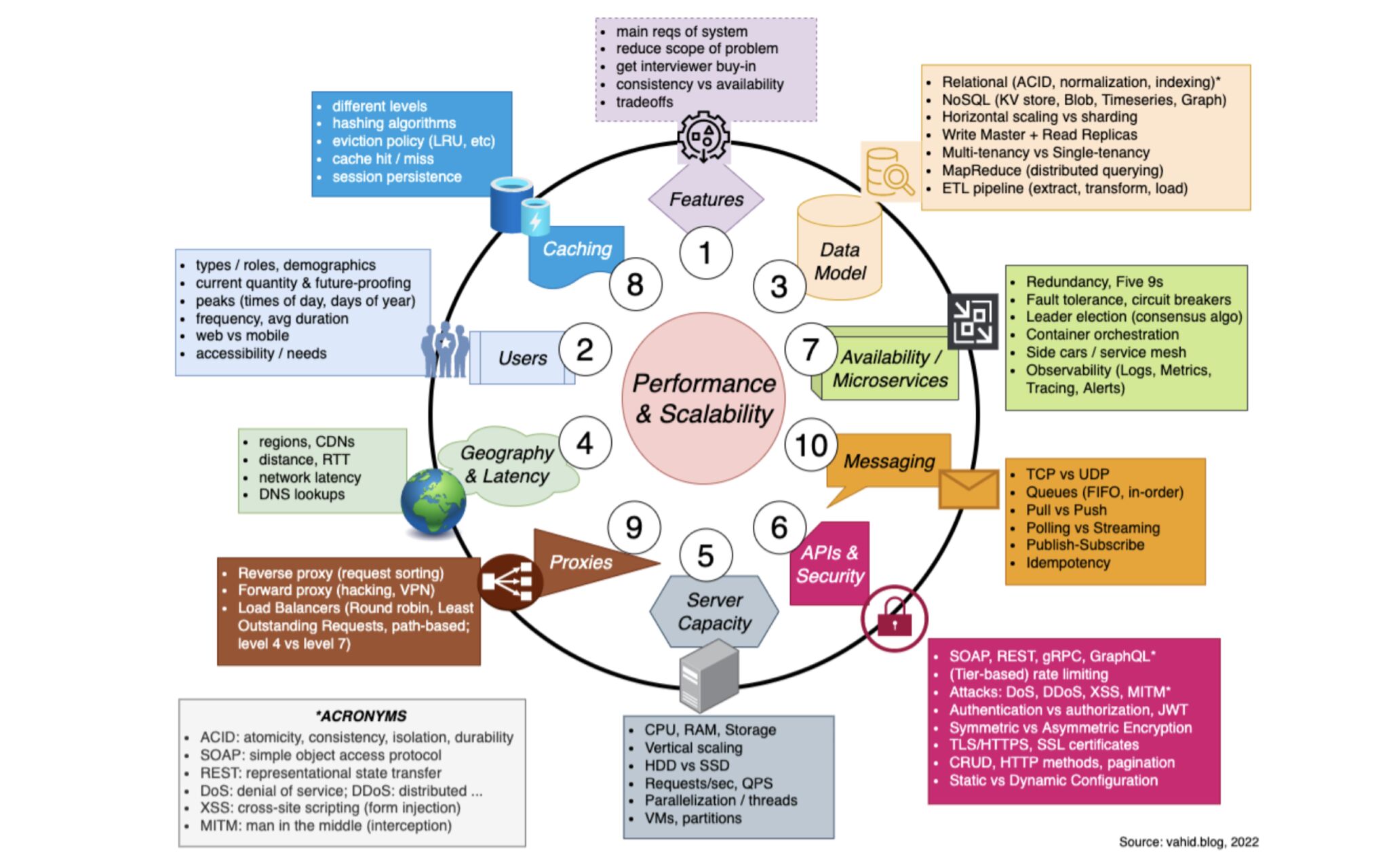
Please remember the below Diagram, beautifully captured by Vahid, to get a strong hold on System Design.
- Features
It’s always good to start with recapping the main features of the system you are trying to build. The prompt you get is typically vague on purpose–so reviewing the features is a good way to start.
- Users
Next, think about the users of the system. Are there different types? (admin, user, etc). When do most users use the system, and how many people do we need to serve? How fast is our userbase growing?
- Data Model
Once you have a good understanding of the features of the system, and the types of users you need to handle, you are ready to tackle the data model. Here, you should think about whether there’s any particular reason why a NoSQL database would be better than a relational database for your use case
- Geography & Latency
The next issue you may want to consider and possibly address is related to reducing latency, especially if your system is spread out across the globe.
- Server Capacity
Next is the issue of the hardware capacity of the servers themselves, including the ones hosting your databases. What are the CPU, RAM, and storage needs?
- APIs & Security
If you’re designing an external or internal API, there are several points to consider. Soap vs Rest Vs GraphQL
- Availability / Microservices
If your system needs to have high availability (think five 9s: 99.999% availability per year), how could you ensure this? What types of redundancies could you set up so that you’ve always got an available server in case one crashes? If you’ve got microservices depending on each other.
- Caching
To increase the speed of reads, you may take advantage of caching, which can be done on multiple levels / layers of your system. What could you cache directly on the user’s device? What would you cache just between a microservice and your database?
- Proxies
This brings us to next topic: proxies! If availability is important (and it almost always is), you’re probably going to have multiple instances of the same server, and you’ll therefore need one or more load balancer(s), which is a type of reverse proxy.
- Messaging
Finally, it might be worthwhile to consider any messaging paradigms and tools you might use, whether for your internal, server-to-server communication, or between end users and your servers.
Do you need to use some kind of messaging bus like Kafka or RabbitMQ, push/pull based ?
Above points will surely help you in a long term
The C4 Model
| Dr Milan Milovic | The C4 Model |
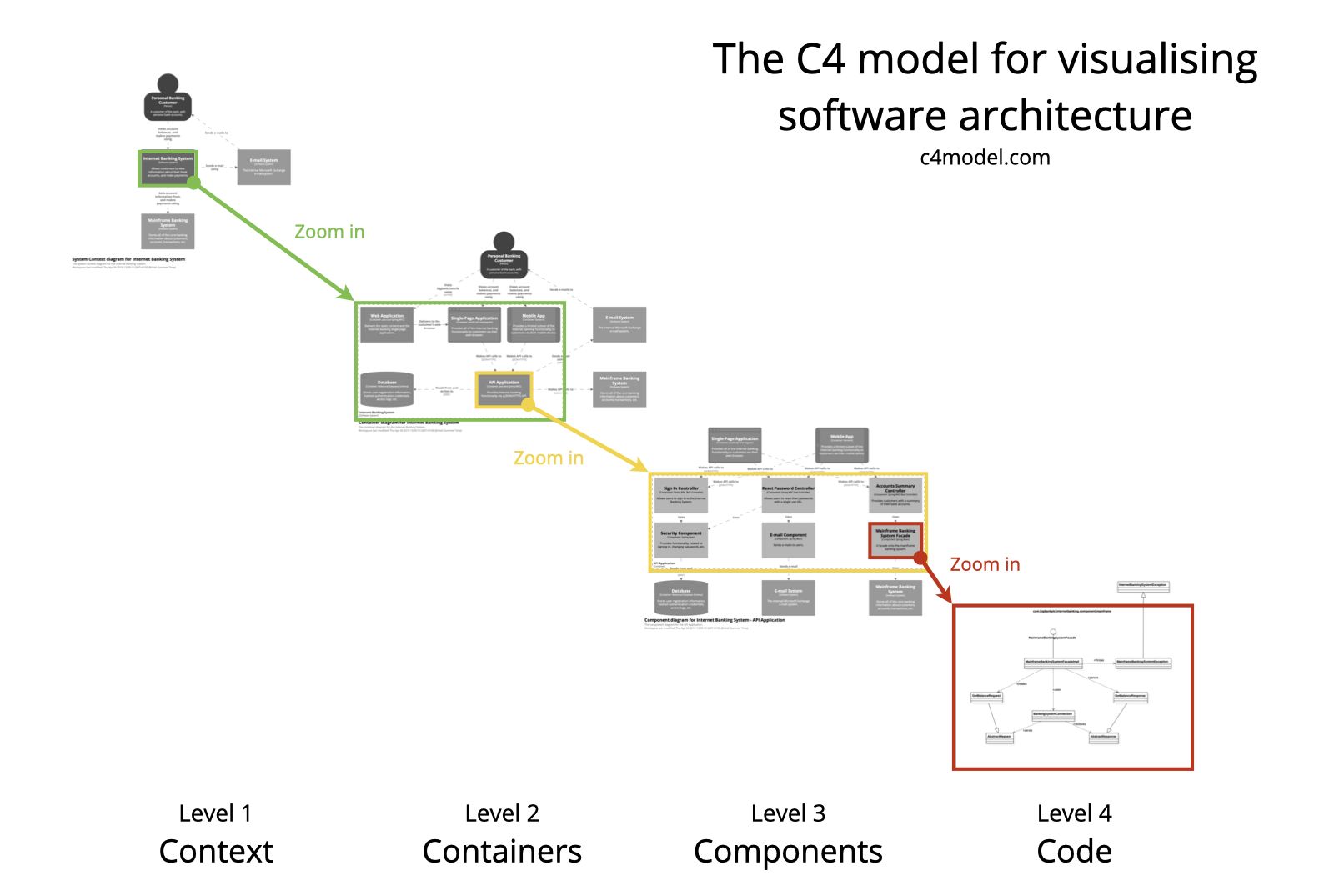
When developing software, it is important to have a clear plan and understand how different components of the system will work together. Documentation and diagramming help us to achieve this by providing a 𝘃𝗶𝘀𝘂𝗮𝗹 𝗿𝗲𝗽𝗿𝗲𝘀𝗲𝗻𝘁𝗮𝘁𝗶𝗼𝗻 𝗼𝗳 𝘁𝗵𝗲 𝘀𝗼𝗳𝘁𝘄𝗮𝗿𝗲 𝗮𝗿𝗰𝗵𝗶𝘁𝗲𝗰𝘁𝘂𝗿𝗲. This helps different stakeholders, like developers, testers, and clients, to have a common understanding of the software design.
One of the preferred ways to visualize the software architecture is 𝘁𝗵𝗲 𝗖𝟰 𝗺𝗼𝗱𝗲𝗹, developed by Simon Brown, a software architect, and author. The C4 model examines a software system’s static structures containers, components, and code. And individuals use the software programs we create.
The C4 model consists of 𝗳𝗼𝘂𝗿 𝗹𝗲𝘃𝗲𝗹𝘀 𝗼𝗳 𝗮𝗯𝘀𝘁𝗿𝗮𝗰𝘁𝗶𝗼𝗻, which are represented by four different types of diagrams:
🔹 𝗖𝗼𝗻𝘁𝗲𝘅𝘁 (𝗟𝗲𝘃𝗲𝗹 𝟭): System Context diagram - This diagram shows the system in context, providing an overview of the system and its environment. The system here is the highest level of abstraction and it shows the system under consideration as a box in the center, surrounded by its users and other systems that interact with it. These diagrams help provide a big-picture overview.
🔹 𝗖𝗼𝗻𝘁𝗮𝗶𝗻𝗲𝗿𝘀 (𝗟𝗲𝘃𝗲𝗹 𝟮): Container diagram - This diagram shows the high-level components or services within the system and how they are connected. It shows each component as a box with its internal details abstracted away, which are separately deployable or executable. Containers can represent APIs, databases, file systems, etc.
🔹 𝗖𝗼𝗺𝗽𝗼𝗻𝗲𝗻𝘁𝘀 (𝗟𝗲𝘃𝗲𝗹 𝟯): Component diagram - This diagram shows the internal components of a container and how they interact with each other. Here we can visualize abstractions in our codebase. E.g. in C#, it is an implementation class behind some interface.
🔹 𝗖𝗼𝗱𝗲 (𝗟𝗲𝘃𝗲𝗹 𝟰): Code diagram - This diagram shows the detailed structure of a single component or module, including its classes and their relationships.
Most teams should at the very least produce and keep up-to-date 𝗰𝗼𝗻𝘁𝗲𝘅𝘁 𝗮𝗻𝗱 𝗰𝗼𝗻𝘁𝗮𝗶𝗻𝗲𝗿 𝗱𝗶𝗮𝗴𝗿𝗮𝗺𝘀 for their software system. If they are useful, component diagrams can be made, but for long-term documentation needs, you’ll need to figure out how to automate changes to these diagrams.
Image source: c4model. com.