Kubernetes: Pod Troubleshooting Techniques
kubernetes | Mushad Mannambeth | Mumshad Mannambeth |
-
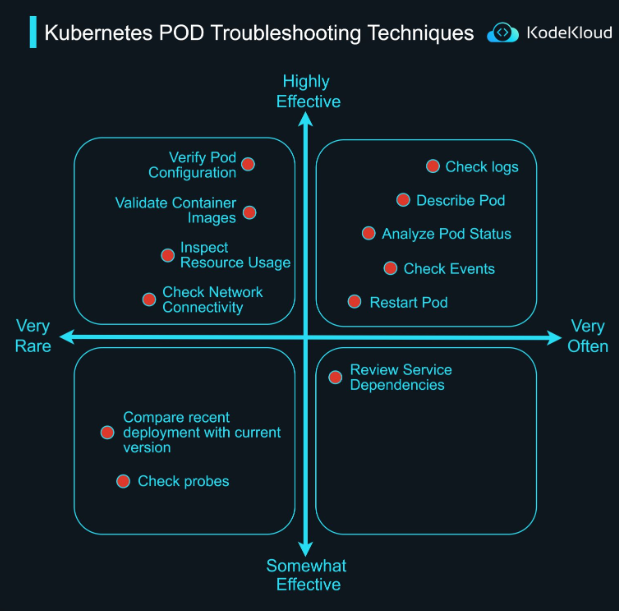
Check logs: Use ‘kubectl logs
’ -
Analyze Pod Status: Use ‘kubectl get pod
’ and examine the status fields -
Describe Pod: Execute ‘kubectl describe pod
’ -
Verify Pod Configuration: Review the pod’s YAML configuration using ‘kubectl get pod
-o yaml' -
Check Events: Run ‘kubectl get events’
-
Validate Container Images: Check image availability and version in the pod’s YAML using “kubectl get pod
-o=jsonpath='{.spec.containers[*].image}'." -
Restart Pod: Use ‘kubectl rollout restart deployment/
’ -
Review Service Dependencies: Analyze dependencies in the YAML or documentation to ensure required services are available and running
-
Check Network Connectivity: Get a shell in the running container: ‘kubectl exec -it
-- sh’
Use ‘ping’ or ‘curl’ to test network connectivity:
‘ping
-
Inspect Resource Usage: Utilize ‘kubectl top pod
’ -
Check Probes: Execute ‘kubectl describe pod
’
Look for the “LivenessProbe”, “ReadinessProbe”, and “StartupProbe” sections to see if the probes are passing or failing.
- Compare Recent Deployment with Current Version:
Use the following commands:
‘kubectl rollout history deployment/
--revision= ’ ‘kubectl rollout history deployment/ --revision= ’
Comments
Kubectl get events propably the underrated superhero.